




Quick links
SMSPool API: Order, View and Cancel Numbers
- By SMSPool Admin
- SMSPool
The SMSPool API lets you purchase temporary phone numbers, data only eSIMs, and long-term phone numbers, perform carrier lookups and check their status and cancel them programmatically. If you are building a verification workflow or automating number purchases at scale, these three endpoints are the ones you will use most.
This guide covers all three with real request examples and the responses you should expect.
Get your API key and start building
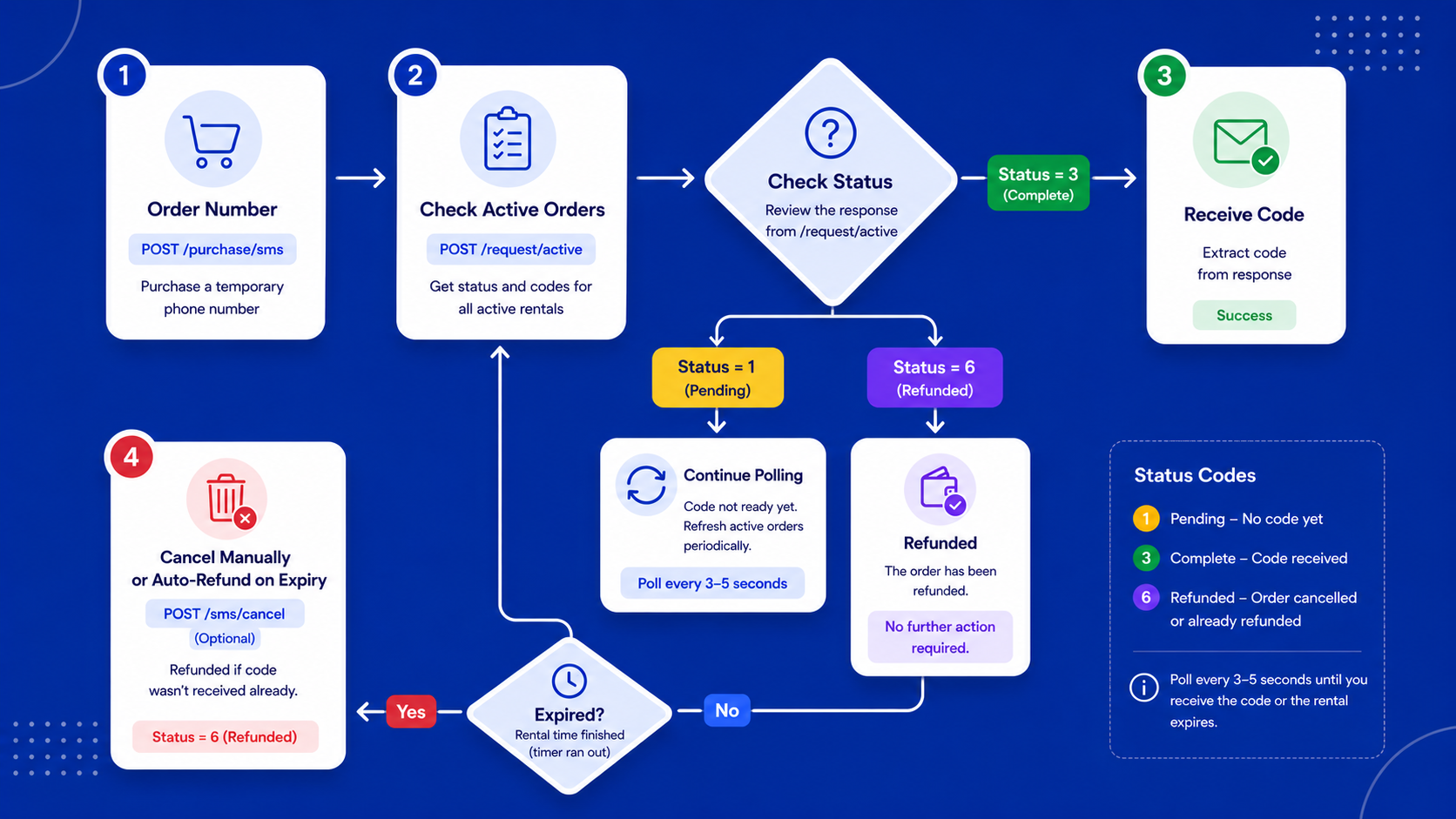
Flow Guide:
What You Need Before You Start
You will need an SMSPool account with a balance and a valid API key. You can find your API key on our How to use the SMSPool API page .
All requests to the SMSPool API use HTTPS POST with form data. There is no SDK required. Any HTTP client works, whether that is Python Requests, PHP's cURL, JavaScript's Fetch, or a tool like Postman.
Your API key is passed with every request. Keep it private. Do not expose it in client-side code or public repositories to prevent unauthorised access to your account.
How to Order a Number via the API
Send a POST request to the order endpoint with your selected country and service. SMSPool returns a phone number and an order ID you will use to track and cancel the order.
Endpoint:
POST https://api.smspool.net/purchase/sms
Required parameters:
Parameter | Description |
|---|---|
| Your API key |
| Country in ISO format or numeric ID from the Country List endpoint |
| Service name or numeric ID from the Service List endpoint |
Optional parameters:
Parameter | Description |
|---|---|
| Pool ID from the Pool List endpoint (defaults to auto) |
| Maximum price you are willing to pay per number |
|
|
| Number of rentals to order at once |
| Area codes to include or exclude, passed as JSON |
| Set to |
|
|
| Set to |
|
|
Example request (Python):
import requests

data = {
    "key": "YOUR_API_KEY",
    "country": "US",
    "service": "Discord"
}

response = requests.post("https://api.smspool.net/purchase/sms", data=data)
print(response.json())
Successful response:
{
  "success": 1,
  "number": 14155552671,
  "cc": "1",
  "phonenumber": "4155552671",
  "order_id": "ABCDEFGH",
  "country": "United States",
  "service": "Discord",
  "pool": 1,
  "expires_in": 1200,
  "expiration": 1705309968,
  "message": "You have succesfully ordered a discord number from pool: Foxtrot for 0.24.",
  "cost": "0.24",
  "cost_in_cents": 24
}
Save the order_id. You will need it to check for incoming codes and to cancel the order if needed.
Common failure responses:
Out of stock:
{
  "success": 0,
  "type": "OUT_OF_STOCK"
}
Insufficient balance:
{
  "success": 0,
  "type": "BALANCE_ERROR"
}
No pool found under your max price:
{
  "success": 0,
  "type": "PRICE_NOT_FOUND"
}
How to Check an Order and Retrieve SMS Codes
Once you have placed an order, poll the check endpoint to see if a code has arrived. SMSPool does not push notifications, so your application needs to poll on a schedule.
Endpoint:
POST https://api.smspool.net/sms/check
Required parameters:
Parameter | Description |
|---|---|
| Your API key |
| The |
Example request (Python):
import requests

data = {
    "key": "YOUR_API_KEY",
    "orderid": "ABCDEFGH"
}

response = requests.post("https://api.smspool.net/sms/check", data=data)
print(response.json())
The response uses a numeric status field rather than a success flag. Here are the values you need to handle:
Status | Meaning |
|---|---|
| Pending - no code yet |
| Complete - code received |
| Refunded |
Response when pending:
{
  "status": 1,
  "resend": 0,
  "expiration": 1704562249,
  "time_left": 1173
}
Response when a code has arrived (status 3):
{
  "status": 3,
  "sms": "12345",
  "full_sms": "Full code: 12345",
  "expiration": 1704562249
}
Response when refunded (status 6):
{
  "status": 6,
  "message": "This order has been refunded",
  "resend": 0,
  "expiration": 1704562249,
  "time_left": 1134
}
sms contains the extracted code. full_sms contains the complete raw message. Use time_left (in seconds) to know when to stop polling.
A polling interval of 3 to 5 seconds is reasonable. Most codes arrive within 30 to 60 seconds.
How to View All Active Orders
You can retrieve all of your currently active orders in one request. This is useful for dashboards or any workflow where you are managing multiple numbers at once.
Endpoint:
POST https://api.smspool.net/request/active
Required parameters:
Parameter | Description |
|---|---|
| Your API key |
Example request (Python):
import requests

data = {
    "key": "YOUR_API_KEY"
}

response = requests.post("https://api.smspool.net/request/active", data=data)
print(response.json())
Successful response:
[
  {
    "timestamp": "2024-01-06 18:03:15",
    "cost": "0.24",
    "order_code": "ABCDEFGH",
    "phonenumber": "1234567890",
    "code": "0",
    "full_code": "",
    "short_name": "US",
    "service": "discord",
    "status": "pending",
    "expiry": 1704561795,
    "time_left": 1126
  }
]
Note that active orders use order_code and phonenumber, not order_id and number. Use time_left (seconds) to track how long each rental has remaining.
How to Cancel an Order via the API
You can cancel an active order before it expires. Our system will automatically refund you if no code was received within the time period.
Endpoint:
POST https://api.smspool.net/sms/cancel
Required parameters:
Parameter | Description |
|---|---|
| Your API key |
| The |
Example request (Python):
import requests

data = {
    "key": "YOUR_API_KEY",
    "orderid": "ABCDEFGH"
}

response = requests.post("https://api.smspool.net/sms/cancel", data=data)
print(response.json())
Successful response:
{
  "success": 1,
  "message": "The order has been cancelled, and you have been refunded 0.24 dollars."
}
Order not found:
{
  "success": 0,
  "message": "We could not find this order!"
}
Too early to cancel (time-locked):
{
  "success": 0,
  "message": "Your order cannot be cancelled yet, please try again later."
}
There is a short window at the start of a rental during which cancellation is locked. If you get the "cannot be cancelled yet" response, wait a few seconds and retry. Once cancelled, the refund is instant.
Handling Errors
Always check the success field first. For the check endpoint, use the numeric status field instead.
Common issues:
Error | Cause |
|---|---|
| Top up your account before ordering |
| No numbers available for that service and country combination |
| No pool available under your |
| Wrong |
| Cancellation is time-locked at the start of a rental - retry after a few seconds |
HTTP 429 means you are hitting rate limits. Back off and retry later.
Building a Reliable Ordering Loop
For automating verification at volume, a solid ordering loop looks like this:
- Check your account balance before ordering
- Place the order, store the
order_id - Poll the check endpoint every 3 to 5 seconds, handling status
1,3, and6 - If status
3arrives, extract the code fromsmsand proceed - If the rental expires without a code, cancel the order and retry with a new number
- Log every
order_idand outcome for debugging
Run multiple orders in parallel rather than sequentially when working at volume. Use the active orders endpoint to track everything at once.
FAQ
What can I do with the SMSPool API? The SMSPool API gives you programmatic access to all of our services, including temporary SMS verifications for hundreds of services and countries, long-term rental numbers, data-only eSIMs, carrier lookups, balance and order history checks, and workflow automation within your own applications or tools.
Do you have an SMS-Activate or Hero-SMS compatible API? Yes. You can use the SMS-Activate/Hero-SMS stub endpoint at https://api.smspool.net/stubs/handler_api. Supported parameters are pool, maxPrice, action, country, and service. By default you must use SMS-Activate/Hero-SMS service and country IDs. If you want to use SMSPool IDs instead, add &setting=smspool to your request.
How do I get my SMSPool API key? Log into your account and go to the API section of your dashboard. Keep it private and regenerate it if you think it has been compromised.
What happens if I do not cancel an order? You will be automatically refunded by our system if the code is not received within the time period.
Can I order numbers for multiple services at the same time? Yes. Each order is independent. You can have as many active orders as your balance supports provided that you are receiving SMS. Use the active orders endpoint to track all orders at once.
Can I remove rate-limits?Yes. You can remove order rate limits by applying for a Business Account.
Why is my order returning OUT_OF_STOCK? The service and country combination you requested has no available numbers right now. Try a different country if the service supports it, or retry shortly.
How long do SMS rentals last? The expires_in field in the order response tells you the duration in seconds. time_left in the check and active orders responses tells you how many seconds remain from the current moment.
What is the difference between sms and full_sms in the check response? sms is the extracted verification code. full_sms is the complete raw message text. For most use cases sms is all you need, but full_sms is useful if the service includes extra context in the message.
Can I request a specific carrier? Yes, but only on pool Foxtrot for US numbers. Pass carrier as 1 or 2 in your order request.
What does activation_type do? It controls how the verification code is delivered. SMS receives a standard text message, VOICE receives a phone call that reads out the code, and FLASH is for flash calls used by some verification flows. The Default is SMSand this feature only works on the Mike pool at the moment.
Is there a rate limit on the API? Yes, the rate limit is 32 requests per second for normal accounts. Sending too many requests in a short window returns a 429 response (Also known as a rate-limit).
Can I use the API without a positive balance? No. You can authenticate and query informational endpoints without balance, but any order attempt will return a BALANCE_ERROR.
Why does my cancellation return "cannot be cancelled yet"? There is a short time-lock at the start of every rental. Wait a few seconds and try again. This is different from an order that cannot be cancelled because it is already complete or expired.
What programming languages can I use with the SMSPool API? Any language that can make HTTPS POST requests with form data. Python, PHP, JavaScript, Ruby, Go, and cURL all work without any special setup.
Ready to start building? Get your API key from the SMSPool dashboard and place your first order in minutes.
For the full API reference, see the SMSPool API documentation or browse the SMSPool Postman collection.
Return to knowledgebaseAbout the author
SMSPool Admin
The owner of SMSPool.net, a site that originally started as a hobby but saw rapid expansion due to the high demand, loves anything technology related and loves writing about technology related articles.
www.smspool.netOther interesting articles
Get WeChat Account Verification
Discover how to enhance your WeChat SMS verification and virtual phone number privacy. Simplify your WeChat account verification process while ensuring privacy.
- By Admin
- February 13, 2024
How to change your SMSPool Password
Step-by-step tutorial on changing your SMSPool password.
- By Admin
- December 27, 2025
How to get an Yubo SMS verification
How to register on Yubo without using your phone number? This guide will show you how to use our Yubo SMS verification service to get a phone number for Yubo.
- By Admin
- May 28, 2023
How to favourite countries and services
Step-by-step guide on how to favourite countries and services on SMSPool
- By Admin
- January 10, 2026
Improve your privacy using SMSPool
How to improve your privacy and prevent scammers from getting access to your personal information using our temporary SMS verification
- By Admin
- February 2, 2022
How to receive a Voice OTP or Flash Call
This guide showcases how to use our Voice OTP/Flash Call feature on SMSPool.
- By Admin
- November 6, 2025
How to get a Bumble SMS verification
In this guide we'll provide you the latest tips and tricks to get a Bumble SMS verification
- By Admin
- March 21, 2023