




Quick links
How to Export Your SMSPool Account Data
- By SMSPool Admin
- Your Account
Your SMSPool account data belongs to you. Whether you want to keep records of your order history, review your usage, or simply have a local backup, exporting your data takes less than 30 seconds.
Why Export Your Data?
A full data export gives you a broader overview of your SMSPool account all in one file. SMSPool already allows separate export of your order history, but this complete version covers more than just phone number orders. Exporting your full account data means you always have an offline copy to hand, whether you need it for your own records, accounting, or just peace of mind.
What You Need
- An SMSPool account
- A web browser
How to Export Your Data
Step 1: Log in to your SMSPool account
Head to SMSPool.net and log in with your credentials.
Step 2: Go to the Settings Menu
Click the Settings cog icon on the top right of the Dashboard.

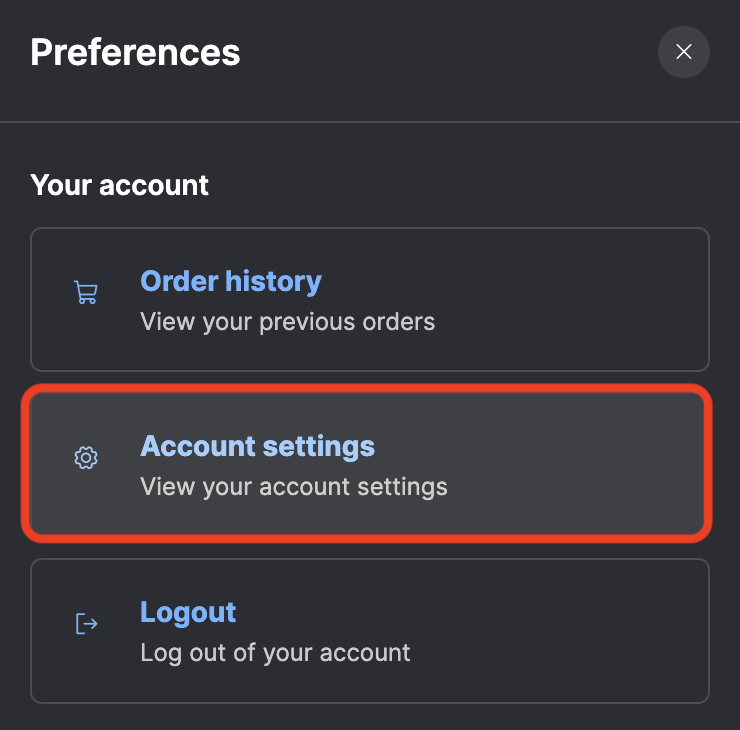
Step 3: Click Account Settings
Click Account Settings
Step 4: Download your data
Scroll down until you see the Download My Data (JSON) button. Click the download button and your data file will be prepared and downloaded instantly.

What's in the Export?
Your data is exported as a JSON file, JSON is a widely supported format that can be opened with any text editor, spreadsheet tool, or imported into other applications. It contains a full overview of all of your account data at the time of exporting.
Frequently Asked Questions
Is there a limit to how many times I can export my data? No. You can download your data as many times as you need.
Does exporting my data delete anything from my account? No. Nothing is removed from your SMSPool account.
What can I use the JSON file for? You can open it in a text editor to review it directly, import it into a spreadsheet tool like Excel or Google Sheets for analysis, or store it as an offline backup of your account history.
I downloaded the JSON file but cannot open it. What do I do? JSON files are plain text. If your system does not open them automatically, right-click the file and choose "Open with", then select any text editor such as Notepad (Windows) or TextEdit (macOS).
Return to knowledgebaseAbout the author
SMSPool Admin
The owner of SMSPool.net, a site that originally started as a hobby but saw rapid expansion due to the high demand, loves anything technology related and loves writing about technology related articles.
www.smspool.netOther interesting articles
How to get an Airbnb SMS verification
This guide provides a step-by-step tutorial on creating an Airbnb account using our Airbnb SMS verification service.
- By Admin
- May 28, 2023
Battle.net Sign Up Without a Phone Number
Stuck on the Battle.net phone verification step? Learn how to securely register a Battle.net/Blizzard account without a personal phone number using SMSPool.
- By Admin
- April 5, 2026
How to get a Lyft SMS verification
A step-by-step tutorial on how to create a Lyft account without using your own phone number for Lyft.
- By Admin
- May 28, 2023
Why You Should Use an Online SMS Provider
Why should you use an online SMS provider to receive non-VoIP SMS verifications to maximize your security?
- By Admin
- January 20, 2022
How to get a Doublelist SMS verification
This guide shows you how to create a Doublelist account with our Doublelist SMS verification service.
- By Admin
- April 28, 2024
How to receive a Voice OTP or Flash Call
This guide showcases how to use our Voice OTP/Flash Call feature on SMSPool.
- By Admin
- November 6, 2025
How to Pass Bovada SMS Verification
Learn how to pass Bovada phone verification securely. Discover why free VoIP numbers fail and how to get a real USA number to ensure safe, reliable withdrawals.
- By Admin
- April 10, 2026