




Quick links
How to Get a Google SMS Verification Number
- By SMSPool Admin
- Guides
You will need a real non-VoIP phone number from an SMS verification service if you want to verify your Google account without using your personal phone number. SMSPool is a service that offers non-VoIP phone numbers for Google and Gmail account registration starting at 0.96. Your Google or Gmail SMS verification code is sent to you within 30 seconds. If you do not receive a code after requesting a number, you will not be charged.
→ Get a Google SMS verification number
Google usually needs a phone number to verify new accounts. This is the case even if you are just creating a standard Google account, a Gmail address, or accessing services that are tied to your Google account. If you do not want to give your personal number for privacy reasons, then using an SMS verification service is the easy solution.
Besides non-VoIP temporary numbers, SMSPool also offers long-term non-VoIP numbers for Google SMS verification. These numbers are not like free or paid VoIP apps. They come from real mobile carriers, so they are indistinguishable from other real phone numbers, and because of this, Google accepts them.
Why Google SMS Verification Requires a Real Phone Number
Google implements SMS verification as a technique to curb spam and to not only ensure that a new account is created by a real person but also to confirm that the number belongs to a genuine mobile carrier.
Google blocks VoIP numbers from TextNow, Talkatone, or TextFree by detecting them as VOIP numbers (virtual numbers). What you actually require is a non-VoIP number connected to a real cellular carrier, which is what SMSPool is all about.
If you are specifically looking to set up Google Voice, refer to our step-by-step article on how to get a Google Voice SMS verification number.
Before You Start: Browser and IP Setup
Besides your phone number during registration, Google is capable of tracking much more. Before you set up a new account, make sure you have these two things sorted.
Open a fresh browser session. Do not use your normal browser where your existing Google account is signed in. Open a separate browser profile. Brave is a solid free alternative with built-in fingerprint protection feature. If you are juggling multiple accounts, Multilogin is a better option as it completely isolates each session. (Use code SMSPOOL for 50% off Multilogin monthly plans.)
Use a home IP from your country. Standard VPNs with datacenter IPs get flagged by Google regularly. A residential proxy gives you an IP address from a real home connection which is something that Google trusts more. The IP country should be the same as the phone number's country for the highest success rate. It is preferred to use your home IP address for this, if you're not comfortable doing so, residential proxy services such as ProxyApp.net are highly recommended for this use case. Before you start Google/Gmail registration, make sure your IP address is clean by visiting IPQualityscore.com.
Google is among the toughest services to verify. Using a new browser profile together with a residential IP that corresponds to the account country gives you the greatest opportunity to pass SMS verification seamlessly.
How to Get a Google SMS Verification Number
Here is how to get verified in a few minutes:
- Create an SMSPool account. Head to SMSPool.net. Registration is fast and does not require an email address if you prefer not to provide one.
- Add funds to your balance. Go to the Deposit page and add credit to your account. SMS verifications on SMSPool are low-cost, we would suggest adding $3 USD to get started which will give you enough for several verifications.
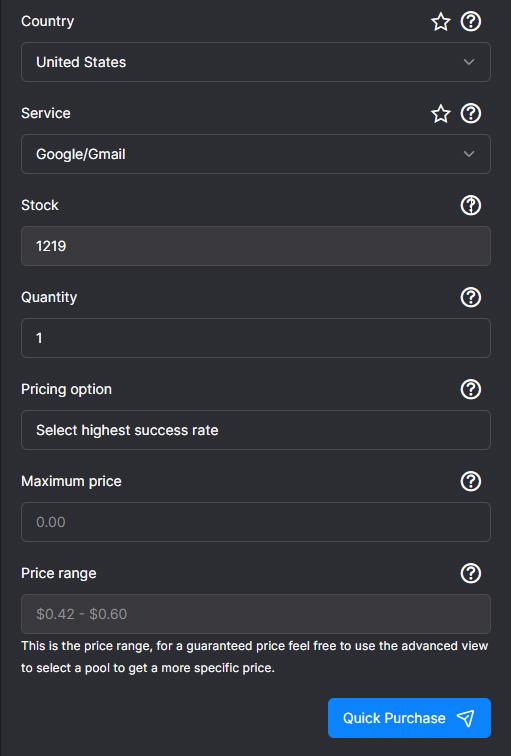
- Order a number for Google/Gmail. Navigate to the Order page. Choose the country that matches your IP address. In the service field, search for and select Google/Gmail.
- Complete the purchase. Click the Quick Purchase button. SMSPool will generate a real, non-VoIP phone number for you within seconds.
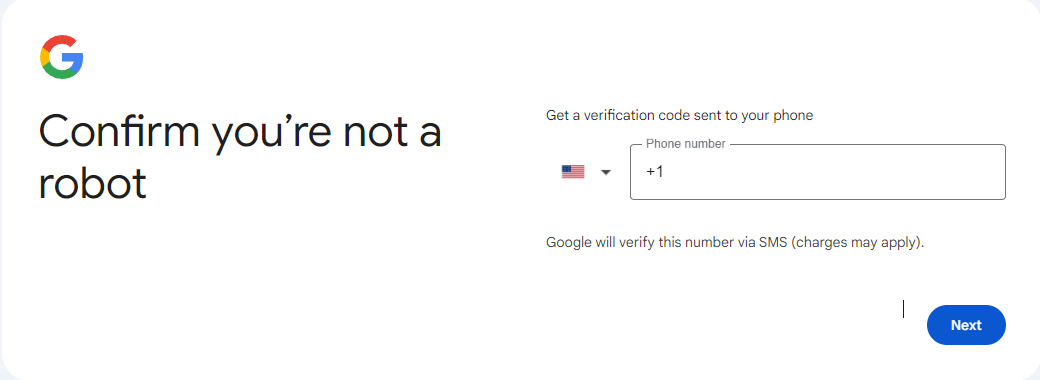
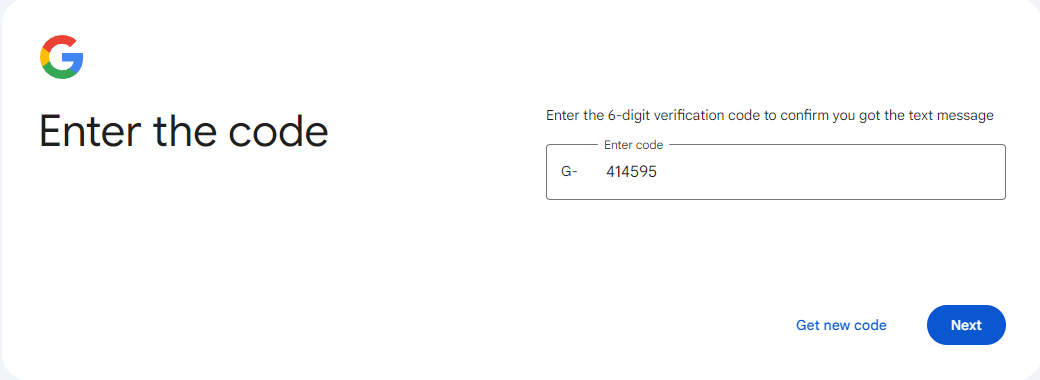
- Verify your Google account. Copy the phone number SMSPool gives you and enter it into the Google verification prompt. Wait for the SMS code to appear in your SMSPool dashboard, then enter it on the Google page. Once confirmed, your account is verified.
How to Receive Your Google SMS Verification Code
Once you have entered the number into Google and requested the code, head back to your SMSPool order page.
Your verification code will appear under the code section within 30 seconds. In some cases it can take up to three minutes. Do not close the Google tab or navigate away from the registration page while you wait, as doing so can invalidate the session.
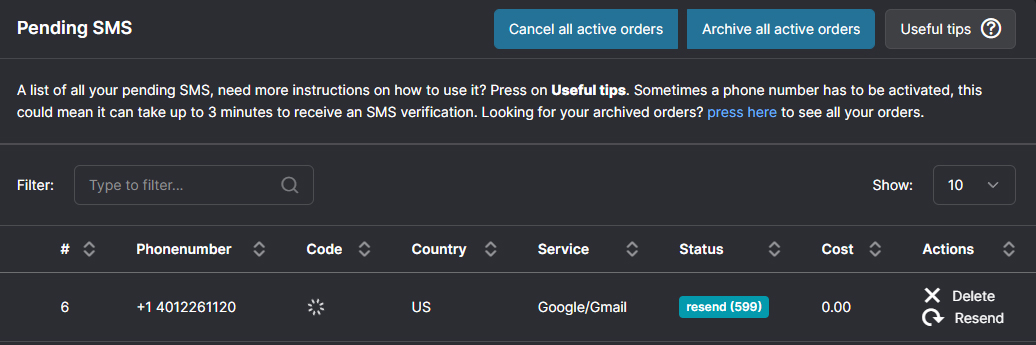
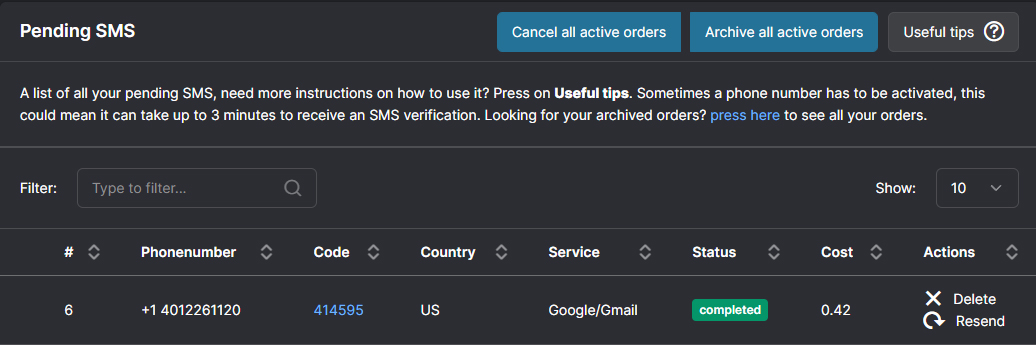
Once the code appears, copy it and paste it into Google to complete verification.
Is SMSPool Free for Google SMS Verification?
While we do not recommend using our free numbers for something as important as a Google/Gmail account, it is an option which you can find at the Free SMS Verification page. The reason we do not recommend them is because the phone number is shared with everyone on that page unlike our paid temporary numbers or long-term rental numbers. This means that someone could log in to your Google account.
Prices for Google/Gmail verification numbers at SMSPool start from 0.96. In case no verification code is delivered, the order is automatically credited back to your SMSPool balance. You are charged for the phone number when the SMS verification succeeds.
Google SMS Verification Not Working?
If you are not receiving a code, review this checklist:
Wait for three minutes. Codes can sometimes even take three minutes to get to you. It is best not to ask for a new code until you have waited at least two to three minutes.
Don't leave the Google registration page. If you go away, Google might invalidate the session and the code will not arrive even if the number is right.
Match your number to your location. If codes are not arriving, start a fresh browser session and make sure the number's country matches your IP. Use your home IP for the best results. If you would rather not use your home IP, a residential proxy from the same country as your number is the next best option. Avoid free VPNs or TOR for this otherwise it's likely the SMS will not arrive. Check out our article on why we strongly advise against free VPNs.
Google wants you to scan a QR code instead of entering a number. That means Google has identified your session as suspicious and will not allow you to verify just by SMS. SMSPool is not able to send SMS, only receive codes, so it is impossible to do QR-based verification this way. The best way is to start over completely: delete all cookies, make a new browser profile, get a different residential IP, and then try registering anew.
If this continues, open an SMSPool support ticket from your account.
Short-term vs Long-term Numbers For Google Verification
SMSPool offers two kinds of Google phone numbers. Which one you need depends on what you are using the account for.
Short-term numbers are meant for one time use purposes, we aren't compromising on quality either as these are also non-VoIP. You get your verification code and the number disappears within hours or days afterwards. These are perfect if you just want to set up a new Google or Gmail account as a burner account. Most people ordering a Google verification number will want this option if the account isn't important.
Long-term rentals provide you with an actual non-VoIP number which can be kept for a month or more, renewable as you go as long as you continue renewing it at least 24 hours before expiry. This comes in handy if you want a stable number connected to a Google account, for instance if Google later takes you to verify your identity again, or if you want to keep a recovery number on file.
Frequently Asked Questions
What is Google SMS verification?
It's a process that Google uses to verify whether you are a genuine human being by sending you a one-time code on your mobile phone via SMS. Google SMS verification is usually required when opening a new Google or Gmail account and occasionally when logging in from a new device or unfamiliar location.
How much does Google SMS verification cost on SMSPool?
With SMSPool, Google SMS verification numbers are available from only 0.96. If you don't get the code, the amount will be returned to your balance automatically. You only pay when verification succeeds.
Can I use a free VoIP number for Google SMS verification?
No. Google blocks VoIP numbers. You have to get a real non-VoIP number, which is what we at SMSPool provide.
Why is my Google SMS verification not working?
Here are some of the main reasons for this: using a VoIP number, navigating away from the Google registration page while waiting for the code, or getting flagged by Google as a suspicious user. Refer to our SMS verification troubleshooting guide for the full set of tips.
What does it mean when Google asks me to scan a QR code?
If Google is asking you to scan a QR code rather than enter a phone number, your session has been flagged as suspicious. This is separate from SMS verification. SMSPool only supports receiving codes, not sending SMS, so QR-based verification cannot be completed this way. Start a fresh browser session with a new residential IP and attempt registration again. Note that if you are trying to register the same Google account, this prompt may still appear.
How long does it take to receive a Google SMS verification code on SMSPool?
Generally, most codes arrive within 30 seconds. In some cases it might take up to three minutes. If you do not receive a code before the timer runs out, our system automatically cancels the order and refunds the money to your SMSPool balance.
Does SMSPool work for Gmail SMS verification?
Absolutely. Gmail SMS verification is identical to the verification of a Google account. So, you can pick Google/Gmail as the service on the SMSPool ordering page and carry out the same steps as described above.
What countries are available for Google SMS verification on SMSPool?
SMSPool offers numbers of a large variety of countries. You can view the full list of countries on our Countries and services supported by SMSPool page.
Can I reuse the same number for multiple Google accounts?
Yes. However, Google usually limits this to 4 accounts under one phone number. We would suggest using our Long-Term rentals if the accounts are important.
Do I need a VPN to use SMSPool for Google SMS verification?
You do not have to use a VPN. However, if Google continues to not send out SMS verification, then a fresh browser session and a residential IP address is highly recommended to ensure a successful SMS verification. A residential IP address is an IP address from a real household, which means it is far less likely to trigger Google's anti-spam system compared to a datacenter IP which 99.9% of VPNs use.
→ Get a Google verification number now
Return to knowledgebaseAbout the author
SMSPool Admin
The owner of SMSPool.net, a site that originally started as a hobby but saw rapid expansion due to the high demand, loves anything technology related and loves writing about technology related articles.
www.smspool.netOther interesting articles
Improve your privacy using SMSPool
How to improve your privacy and prevent scammers from getting access to your personal information using our temporary SMS verification
- By Admin
- February 2, 2022
How to Get DoorDash SMS Verification
Explore DoorDash's culinary evolution, safety of sharing your phone number, and the perks of using a temporary virtual number through SMSPool for enhanced priva
- By Admin
- January 24, 2024
Get Walmart SMS Verification
Enhance your online shopping security with Walmart SMS verification, bolstered by temporary virtual phone numbers for added privacy.
- By Admin
- February 13, 2024
How to get a TikTok SMS verification
In this guide, we'll teach you how to get a TikTok SMS verification without even needing a phone number to receive your SMS verification code.
- By Admin
- December 6, 2022
How to Export Your SMSPool Order History
Step-by-step guide on exporting your SMSPool Order History
- By Admin
- December 18, 2025
How to get a Zalo SMS verification
This guide shows you how to create a Zalo account with our Zalo SMS verification service.
- By Admin
- April 18, 2024
SMSPool Business Account Explained
Learn how to unlock your free SMSPool Business Account. Get step-by-step videos on creating sub-accounts, funding your team, and managing access
- By Admin
- April 16, 2026